Download Exam Tool
Welcome to the INFSTExamTool platform. Download the exam application below to participate in your exams. Make sure you are logged in as Exam01 on your computer before running the application.
Download Exam ToolWindows Security Warning
When you download the exam tool, Microsoft Edge and Windows may show security warnings because this is an internal application. This is normal and safe. Follow these steps to proceed:
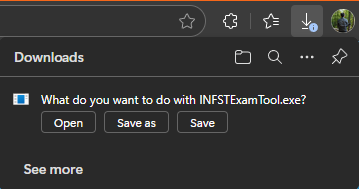
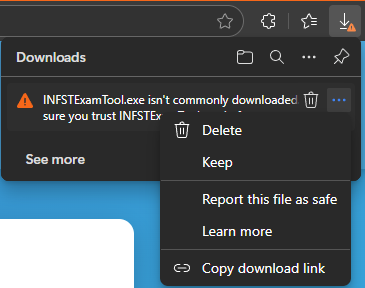
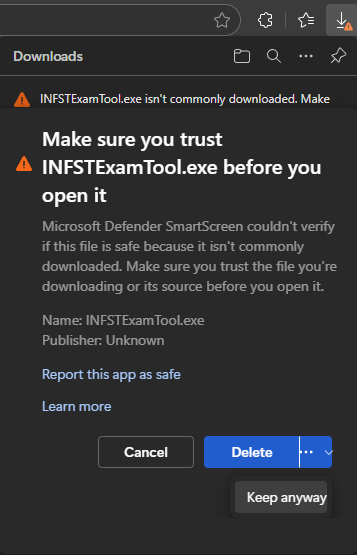
Instructions:
- Make sure you are logged in as Exam01
- Download the Exam Tool using the button above
- Run the INFSTExamTool.exe application
- Select your exam from the list
- Log in with your Moodle credentials (username and password)
- Complete your exam within the allocated time
- Submit your work before the deadline
Important Notes:
- You can save drafts during the exam
- The last 10 drafts are automatically saved
- Make sure to submit your final version before time runs out
- If you don't submit, your last draft will be converted to a final submission
- Your computer activity will be monitored during the exam